
Artwork upload guidelines
High-quality artwork is the foundation of high-quality products. This guide explains how to prepare, size, and save your files so your prints look sharp, vibrant, and professional.
Recommended resolution
- Aim for 300 DPI at the final print size whenever possible.
- For large items (like blankets or posters), use the highest resolution you can reasonably work with.
- Avoid stretching small images to fill large print areas – this can cause pixelation.
Print area & safe zone
Each product has a defined print area:
- Keep all important elements (text, faces, logos) inside the safe zone shown in the designer.
- Allow extra space around the edges for bleed and minor production shifts.
- Avoid placing tiny text or details near seams, edges, or curved areas.
Backgrounds and transparency
For the cleanest print on most products, remove any background color from your artwork unless you intentionally want that background to print.
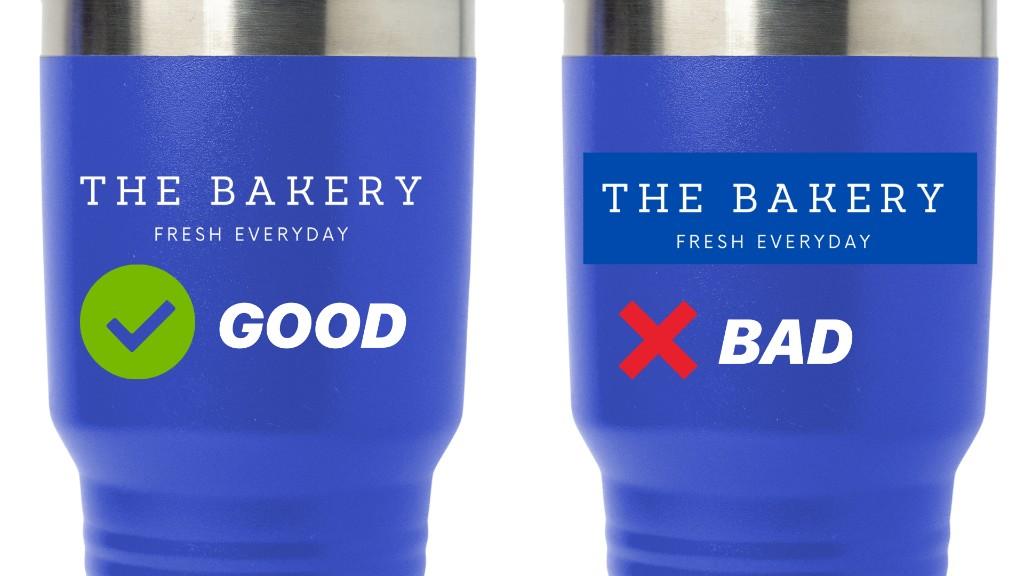
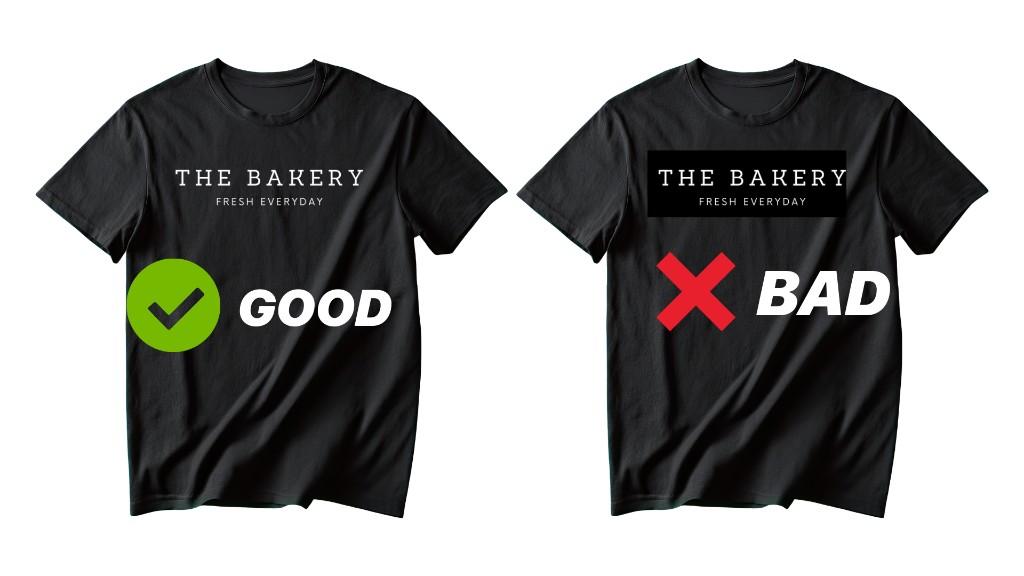
- Anything visible in your uploaded file, including a white or colored background block, becomes part of the final print.
- Save logos, text designs, and isolated graphics with a transparent background so only the artwork itself prints.
- If you leave a background behind by accident, it can show up as a visible box around your design on shirts, drinkware, and other products.
- Only keep the background when it is an intentional part of the design and you want it printed too.
For most non-photo designs, a PNG with transparency is the safest option.
Color recommendations
- Design in RGB (sRGB) color space for best compatibility with our systems.
- Extremely bright neons, metallic effects, and glow effects may not print exactly as they appear on screen.
- Always order a sample when color accuracy is critical.
For more on color, see Color accuracy and profiles.
File size and naming
- Keep file sizes reasonable so they upload smoothly.
- Use descriptive names (for example:
cat_mom_mug_white_11oz_front.png). - Avoid special characters in file names (%, #, ?, etc.).
Content guidelines
You are responsible for the rights to any artwork you upload. Do not upload:
- Copyrighted images you don't own or have permission to use.
- Trademarked logos, characters, or slogans you don't own.
- Content that is hateful, illegal, or violates our terms of service.
Quick checklist before uploading
- ☐ 300 DPI at final print size
- ☐ Important details inside safe zone
- ☐ Unwanted background color removed or saved with transparency
- ☐ No low-resolution or blurry assets
- ☐ File saved in a supported format (see Supported file formats)
- ☐ You have the legal right to use the artwork