
Connect Your eCommerce Store
Learn how to integrate Shopify, Etsy, and TikTok Shop with your Completeful account so orders sync automatically.
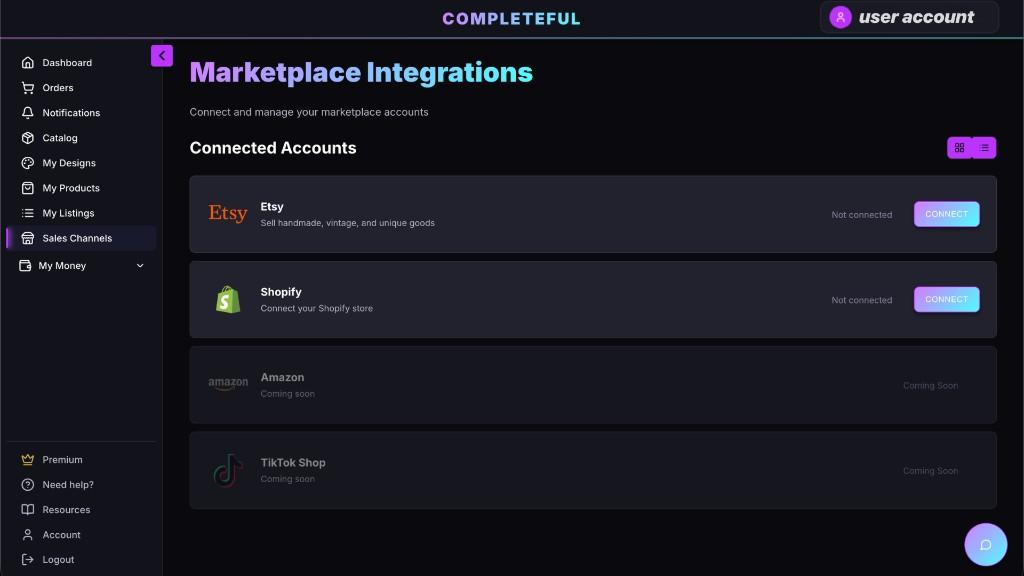
Supported Platforms
Completeful currently integrates with Shopify, Etsy, and TikTok Shop. Choose your platform below for specific integration instructions.
Shopify
Install the Completeful app from the Shopify App Store for instant integration.
View Shopify Setup →Etsy
Connect via OAuth to automatically sync your Etsy listings and orders.
Setup guide coming soonTikTok Shop
Connect TikTok Shop to sync products and orders with Completeful.
Setup guide coming soonGeneral Integration Steps
While each platform has unique setup requirements, the general process is similar:
Navigate to Integrations
Log into your Completeful dashboard and go to Settings → Integrations.
Select Your Platform
Choose your eCommerce platform from the list of available integrations.
Authorize the Connection
Follow the prompts to authorize Completeful to access your store data. You may need to log into your platform.
Configure Sync Settings
Choose which products to sync, set pricing rules, and configure order fulfillment preferences.
Test the Connection
Create a test product or order to ensure everything is syncing correctly before going live.
Important Notes
- Ensure you have admin access to your eCommerce platform
- Some platforms may require you to approve permissions or install an app
- Initial product sync can take 5-15 minutes depending on catalog size
- Contact support if you need help connecting one of our supported integrations.
Need Help Connecting Your Store?
If you're experiencing issues connecting your eCommerce platform, our support team is ready to assist.
Contact Support